
Events, intervals and segments#
Most experiments send events (triggers) to the eye tracker, e.g., when a
stimulus appears or a response is given. Analyses then look at the data in
windows around these events or in the intervals between them.
pypillometry has a class for each step:
        flowchart LR
  E["<b>Events</b><br/>onsets + labels + metadata"] -- "get_epochs(event, window)" --> P["<b>Epochs</b><br/>onsets + one window"]
  E -- "get_intervals(start=event1, end=event2)" --> I["<b>Intervals</b><br/>(start, end) pairs"]
  P -- "get_segments()" --> S["<b>SegmentedEyeData</b><br/>channels: segments x time"]
  S -- "average(by=...), group_segments()" --> G["<b>SegmentedEyeData</b><br/>channels: averages x time"]
  P -- "stat_per_event()" --> N["one value<br/>per event"]
  P -- "to_intervals()" --> I
Events#
events holds the events of a dataset as an
Events object, a list of onsets and labels:
events = d.events                    # onsets in ms
events = d.events.to_units("sec")    # onsets in seconds
events.filter("stim")                # labels containing "stim"
events.filter("stim", exact=True)    # labels equal to "stim"
events.filter(lambda lab: lab.endswith("_1"))
events.filter((60, 120))             # onsets between 60 and 120 s
events[:10]                          # the first ten events
Events cannot be changed in place: filter(),
indexing and the other methods return new Events. You can store
changed events in the dataset with set_events(),
e.g., to remove test trials or to rename labels. Operations that change
the time of the data (crop(),
remove_intervals(),
reset_time()) move the events with it.
add_events() adds events to the existing ones, and
Events.onset() returns the onset of the one event with a given
label (it raises an error unless exactly one event has it):
d.add_events(pp.Events([1500, 2500], ["cue", "cue"], units="ms"))
t = d.events.onset("Start Block 2", units="sec")
Tutorial: Events.
Event metadata#
Each event can have metadata, e.g., the trial, the condition, the choice
or the reaction time. They are stored in events.meta, a read-only
mapping with one numpy array per column (one value per event). Missing values are NaN in
numeric columns and "" in text columns. There are two common sources:
Trigger labels that code information, e.g.,
S_12_3_5for the stimulus of trial 12 with the symbols 3 and 5.parse_labels()decomposes them with a regular expression with named groups (or a function that returns a dict):ev = d.events ev = ev.parse_labels(r"^[FSCR]_(?P<trial>\d+)") ev = ev.parse_labels(r"^S_\d+_(?P<left>\d+)_(?P<right>\d+)") ev = ev.parse_labels(r"^R_\d+_(?P<reward>\d+)")
A behaviour log with one row per trial. If the eye tracker’s events already identify the trials (e.g., by a trial number from the labels),
merge_table()adds the columns of the log to all events of each trial, matched by the values in the columnson:log = pd.read_csv("behaviour.csv") # columns trial, cond, rt, ... ev = ev.merge_table(log, on="trial", columns=["cond", "rt"])
If the events are only in the log,
Events.from_table()creates them and takes the columns with metadata asmeta(see below); each event of a row gets the values of that row.
Information that is coded at one event (e.g., the reward at the feedback)
is copied to the other events of the same trial with
fill_meta(), and add_latency() adds the time
between two events (e.g., the reaction time). filter()
selects events by their metadata:
ev = ev.fill_meta("reward", by="trial")
ev = ev.add_latency("S_", "C_", "rt", by="trial")
ev.filter("S_", reward=20)                     # equal to a value
ev.filter("S_", trial=[1, 2, 3])               # one of the values
ev.filter("S_", rt=lambda rt: rt < 1000)       # function of the column
ev.filter(ev.meta["left"] < ev.meta["right"])  # boolean array
set_events() stores the metadata in the dataset
(e.g., d = d.set_events(ev); they are saved with it), and
get_epochs() and get_intervals() pass the
metadata of the selected events on (epochs.meta,
intervals.event_meta, also in as_pandas()).
to_table() returns the events with their metadata as a dict
of columns, e.g., for pandas.DataFrame().
Tutorial: Event metadata.
Events from a behaviour log#
Often, not all events are sent to the eye tracker. The times of stimuli and responses are then in a behaviour log of the experiment (e.g., from Psychtoolbox, PsychoPy or Presentation), usually a table with one row per trial, with times in seconds on the clock of the experiment computer:
block |
trial |
trialstart |
stim_on |
rt |
|---|---|---|---|---|
1 |
1 |
12.031 |
12.531 |
0.412 |
1 |
2 |
15.204 |
15.704 |
NaN |
1 |
3 |
18.377 |
18.877 |
0.538 |
2 |
1 |
95.880 |
96.380 |
0.611 |
… |
… |
… |
… |
… |
Events.from_table() turns the columns of such a table into
events. The keys of the dict are the labels, the values are column names or
arrays of times; missing times (NaN, e.g., no response) give no event:
ev = pp.Events.from_table(behav, {"stim_on": "stim_on",
                                  "response": behav.stim_on + behav.rt},
                          units="sec")
This gives one event per stimulus and per response, sorted by onset (still
on the clock of the behaviour log, so they are marked as needs_sync):
onset (sec) |
label |
|---|---|
12.531 |
stim_on |
12.943 |
response |
15.704 |
stim_on |
18.877 |
stim_on |
19.415 |
response |
96.380 |
stim_on |
… |
… |
The behaviour log and the eye tracker have different clocks. They have
different zero points and drift apart slowly (a few ms in a typical
session), so a single offset is not exact. sync_clocks() fits a
linear map (offset and drift) from moments that are in both logs, e.g., the
block starts, paired by order. It returns a ClockSync object that
maps times or events to the eye-tracker clock:
starts = behav.groupby("block").trialstart.min()             # in sec
sync = pp.sync_clocks(starts, d.events.filter("Start Block"),
                      src_units="sec")
d.add_events(sync(ev))
Events from Events.from_table() are marked as being on another clock
(ev.needs_sync); add_events(),
set_events() and get_epochs() warn if they
get such events, so a forgotten sync_clocks() does not go unnoticed.
Mapping them with a ClockSync (or Events.shift()) removes
the mark. If the log is on the eye-tracker clock already (e.g., the times
were taken from eye-tracker messages), use
Events.from_table(..., needs_sync=False). Events outside the time range
of the data raise an error.
Other columns of the log become metadata of the
events with meta, e.g.,
pp.Events.from_table(behav, ..., units="sec", meta=["block", "trial", "rt"]).
They are kept by sync and add_events().
sync_clocks() logs a summary of the fit. Check the residuals
(sync.residuals, or print(sync) for a table): with correct pairs,
they show only the timing jitter between the two logs (1–2 ms for times
taken at the screen flip, up to about one frame otherwise); if a pair is
missing in one of the logs, they are much larger and a warning is given
(tol= sets the limit, 5 ms by default). A shift of all pairs by the same
number of trials does not show in the residuals if the trials are evenly
spaced, so check the pairs directly where possible (e.g., trial numbers in
the labels). With a single shared moment, only the offset is fitted.
Tutorial: Events from a behaviour log.
Epochs#
An Epochs object holds some events (an Events object in
ms) and one time window around them, e.g., from 200 ms before to 1000 ms
after each stimulus. get_epochs() selects the events and
the window:
epochs = d.get_epochs("stim", (-200, 1000) * u.ms)
epochs.onsets, epochs.window, epochs.labels, epochs.meta["trial"]
epochs.events                               # the events, as Events
epochs.filter(cond="a", rt=lambda rt: rt < 800)  # select like Events
epochs.keep(epochs.meta["cond"] == "a")     # a subset of the epochs
epochs.set_meta("block", 1)                 # change the metadata
epochs.to_intervals("sec")                  # the spans as Intervals
Selecting and changing the metadata works as for Events
(filter(), set_meta(),
drop_meta(), parse_labels()); the results are
new Epochs with the same window.
Epochs can be used wherever the methods take intervals (e.g.,
mask_intervals(),
exclude_intervals(),
stat_per_event()); they stand for their spans
(onset + window[0], onset + window[1]) in ms. Windows that extend
beyond the recording are not cut off: the methods that read the data use
the part within it (in segments, the rest is masked).
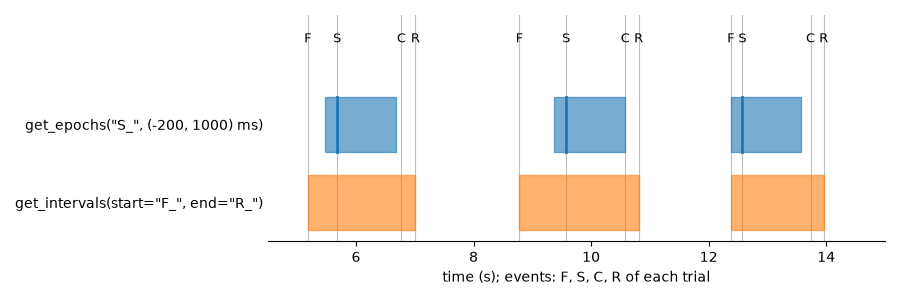
Epochs and intervals compared: get_epochs() gives the same
window around each selected event (here, the stimuli “S”),
get_intervals() the spans between two events (here, from
the fixation cross “F” to the response “R” of each trial), which differ
in length:
Intervals#
An Intervals object is a list of (start, end) pairs, together with
their units and, optionally, one label, onset and metadata row per
interval (e.g., of the event it belongs to), which are kept when
intervals are converted, filtered, padded, combined or merged. Intervals
come from several places:
Source |
Example |
|---|---|
windows around events |
|
spans between two events |
|
detected blinks |
|
other detection methods |
|
masked samples |
|
your own |
|
Intervals can be converted to other units (to_units()),
filtered (filter()), padded (pad()),
merged when they overlap (merge()), combined (+,
concat_intervals()), subtracted (-), summarized
(stats(), as_pandas()) and plotted
(plot()). complement() returns the
periods that are not covered (e.g., blocks.complement(d) gives the time
before, between and after the blocks).
Between two events#
get_intervals() pairs each start event with the next
end event after it. If several start events come before the same
end event (e.g., a missing “End Block”), the last of them is used.
Events without a partner are skipped, and a warning lists them.
"<start>" and "<end>" stand for the start and the end of the
recording:
blocks = d.get_intervals(start="Start Block", end="End Block", units="ms")
breaks = d.get_intervals(start="End Block", end="Start Block", units="ms")
before = d.get_intervals(start="<start>", end="Start Block", units="ms")
String selectors match labels that contain them; with exact=True,
only labels that are equal to them.
Sample indices and time#
Intervals are either in time units (“ms”, “sec”, “min”, “h”) or in sample
indices (units="samples"; plain numbers in the window of
get_epochs() and get_intervals() are ms,
sample indices need
units="samples"). Intervals are
end-exclusive: (start, end) covers the samples with
start <= t < end.
Intervals in sample indices are only valid for the data object they came
from: after crop(),
downsample() or for another recording, the same
indices point to other samples (blinks stored in the object are adjusted
automatically). Therefore, every conversion between sample indices and
time takes the data object and uses its time vector:
blinks = d.get_blinks("left", "pupil", units="samples")["left_pupil"]
blinks.to_units("ms", d)                    # times of these samples
trials.to_units("samples", d)               # first sample at or after each time
mask = trials.to_mask(d)                    # one entry per sample of d
pp.Intervals.from_mask(mask, d, units="ms")
Conversions between time units work without the data object, e.g.,
trials.to_units("sec"). Times are converted to the first sample at or
after them, so recordings that do not start at 0 or have gaps are handled
correctly.
Many methods of the data objects take intervals as input:
Cut the data around events into segments of equal length. |
|
Return result of applying a statistical function to data in a given interval relative to event-onsets. |
|
Apply Intervals as masks to selected data. |
|
Interpolate data within specified intervals. |
|
Plotting data around intervals. |
Tutorial: Intervals.
Segments and event-related pupil dilation#
get_segments() cuts the data in each epoch and returns a
SegmentedEyeData object: one matrix of segments × time points
per channel (by default all channels; choose them by name, or with
eyes= and variables=). Averaged over segments, the pupil channel
is the event-related pupil dilation (ERPD). As for EyeData,
the methods for the pupil are in seg.pupil and those for the gaze in
seg.gaze:
epochs = d.get_epochs("stim", (-200, 1000) * u.ms)
erpd = d.get_segments(epochs, "left_pupil", name="stimulus")
erpd = erpd.pupil.baseline_correct((-200, 0))   # subtract the pre-stimulus mean
erpd.pupil.plot()
erpd["left_pupil"]                               # masked array, time points x segments
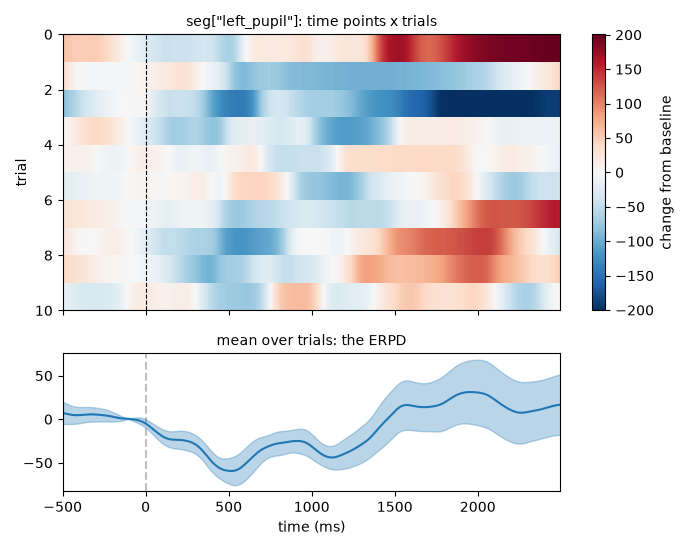
The segments of a channel form a matrix of time points × trials (top, one row per trial, here for the 10 stimuli of the short example dataset); its mean over the trials is the ERPD (bottom, with the standard error):
All channels share the epochs, so trials are selected once for all of
them: filter() selects by label or metadata of
the epochs, keep() with a boolean array (e.g.,
to reject trials with too much missing data):
seg = d.get_segments(epochs)                     # pupil and gaze of both eyes
easy = seg.filter(cond="easy")
good = seg.keep(seg["left_pupil"].mask.mean(axis=0) < 0.5)
The length and the time axis of the segments come from the window: the
time points are window[0] + k * 1000/fs ms (at 500 Hz: -200, -198, …,
998 ms). Parts of a window outside the recording are masked. The segments
keep their epochs (erpd.epochs). get_segments()
also takes Intervals, but only if they all have the same length (the time
axis then starts at 0 at their starts); for intervals between two events,
it raises an error. The baseline window of
seg.pupil.baseline_correct() must be within the segments.
By default, the baseline is subtracted (the change in the units of the
data); method="divide" gives the ratio to the baseline and
method="percent" the change in % of the baseline, e.g.,
erpd.pupil.baseline_correct((-200, 0), method="percent").
seg.gaze analyses the gaze with regions of interest (ROIs, see
Gaze data and the experimental setup): roi_hits() adds a
channel per eye that is 1 where the gaze is in the ROI and 0 outside, so
its mean over the segments is the share of trials in which the gaze is
in the ROI at each time point (a fixation curve, see Regions of interest);
dwell_time() and
first_entry() give one value per
trial, in a table with the metadata of the epochs:
target = pp.CircularROI((640, 512), radius=100, name="target")
seg = seg.gaze.roi_hits(target)          # adds left_target, right_target
seg.gaze.plot_roi("target")              # share of trials in the ROI
import pandas as pd
pd.DataFrame(seg.gaze.dwell_time(target, window=(0, 1000)))
Averages#
average() averages the trials, all of them or
by groups defined by metadata columns of the epochs. The result is a
SegmentedEyeData object with one column per group, so it has the
same methods (plots, baseline correction, selection, write_file()).
Its epochs have no time (their onsets are NaN); their metadata are the
grouping columns, the columns that were the same in all trials of a group,
and the number of trials (n_trials):
by_cond = seg.average(by="cond")               # one column per condition
by_cond.epochs.meta                             # {"cond": [...], "n_trials": [...]}
by_cond.filter(cond="easy").pupil.plot()
An average is masked where all its trials are masked. The share of its
trials that were usable at each time point is kept (valid_share), and
the missing data shown by plot() are the missing
trials.
Several participants are combined in two steps: concat_segments()
stacks their segments, with the participant in the metadata column
"subject", and average() averages them.
group_segments() does both for the usual case of one average per
participant:
segs = {"P01": seg1, "P02": seg2}
group = pp.group_segments(segs)                  # one column per participant
group.pupil.plot()                               # mean and error across participants

allseg = pp.concat_segments(segs)                # all trials, with "subject"
means = allseg.average(by=["subject", "cond"])   # per participant and condition
means.filter(cond="easy").pupil.plot()           # across participants, easy trials
Averaging averages gives each of them the same weight (e.g., each participant). Measures that only make sense for single trials (ROI hits, first entry, see Regions of interest) raise an error for averages.
For statistical models of trial-by-trial data, it is often easier to work
with one number per trial. stat_per_event() applies a
function (by default the mean) to each interval:
peak = d.stat_per_event(window=(500, 1500) * u.ms, event_select="stim",
                        variables="pupil", statfct=np.max)
Tutorial: Event-related pupil dilations.