
Events#
- class pypillometry.Events(onsets, labels, units=UNSET, data_time_range=None, meta=None, needs_sync=False)[source]#
Bases:
StatefulContainer for events with metadata.
This class wraps arrays of event onsets and labels and provides additional functionality such as unit conversion, filtering, and display capabilities.
Onsets are always times (not sample indices), so they stay valid when the data are sliced or resampled.
Events are immutable: onsets, labels and metadata cannot be changed in place; all methods return new Events.
The events of a dataset are obtained with
events. An (e.g., filtered) Events object can be passed as event_select toget_epochs()or stored in a dataset withset_events()or added withadd_events(). Events from a behaviour log can be created withfrom_table()and mapped to the eye-tracker clock withsync_clocks().Each event can have metadata (e.g., trial, condition, reaction time), stored in meta: a read-only mapping of column names to numpy arrays with one value per event. Missing values are NaN in numeric columns and “” in string columns. Metadata come from a behaviour log (see
from_table()), from the labels of the events (seeparse_labels()), from a table with one row per trial (seemerge_table()) or are added withset_meta()andadd_latency(); events are selected by their metadata withfilter().- Parameters:
onsets (
Union[ndarray,List]) – Event onset times (stored as float array); can carry units, e.g.[100, 500] * u.mslabels (
Union[ndarray,List]) – Event labels (stored as array of strings), same length as onsetsunits (
Optional[str]) – Time units of the onsets (“ms”, “sec”, “min” or “h”). Default is “ms”, or the units of onsets if they carry units (otherwise, onsets with units are converted to units).data_time_range (
Optional[Tuple[float,float]]) – Time range (min, max) of the original dataset (in same units as onsets)meta (
Optional[dict]) – metadata: column name -> values (one per event); “onset” and “label” cannot be used as namesneeds_sync (
bool) – True if the onsets are on another clock than the eye tracker (e.g., from a behaviour log) and still have to be mapped withsync_clocks(); default False. Events fromfrom_table()have it set; mapping them with aClockSyncorshift()clears it. Data objects warn about such events (add_events(),set_events(),get_epochs()).
- Raises:
ValueError – If onsets and labels differ in length, if a metadata column has the wrong length, or if the units are not time units (e.g., None or samples).
Examples
>>> events = Events(onsets=[100, 500, 1000], labels=["A", "B", "C"], units="ms")
>>> len(events)
3
>>> for onset, label in events:
...     print(f"{label} at {onset}")
A at 100.0
B at 500.0
C at 1000.0
>>> events = Events([100, 500], ["stim", "resp"],
...                 meta={"trial": [1, 1], "cond": ["easy", "easy"]})
>>> events.meta["cond"]
array(['easy', 'easy'], dtype='<U4')
Methods
Time from each first event to its second event, as metadata.
New Events without the metadata columns names (all, if none given).
Copy metadata to all events with the same value in column by.
Filter events and return a new Events object.
Create Events from a table with one row per trial.
Events where mask is True.
Add metadata from a table with one row per trial.
Onset of the one event with the given label.
Metadata from the labels of the events.
Plot events as points on a time axis.
One event as a dict with its onset, label and metadata.
Set a metadata column.
Events with shifted onsets.
Convert events to numpy arrays.
Events as a table (copies of the columns).
Convert event onsets to different time units.
Details
- classmethod from_table(table, columns, units=UNSET, meta=None, row='row', needs_sync=True)[source]#
Create Events from a table with one row per trial.
Behaviour logs usually have one row per trial and one column per event time (e.g., stimulus onset, response). Each column becomes one kind of event; the column (or dict key) is the label. Missing times (NaN, e.g., no response) give no event. The events are sorted by onset.
Other columns of the table (e.g., condition, reaction time) can be given as meta; every event of a row gets the values of that row as metadata.
The times of a behaviour log are usually on another clock than the eye tracker, so the events are marked as needs_sync: map them with
sync_clocks()before adding them to a data object (which warns otherwise).- Parameters:
table (pandas.DataFrame or dict) – table with one column of times per kind of event
columns (list or dict) – list of column names (labels are the column names), or dict mapping labels to column names or to arrays of times (e.g.,
{"response": df.stim_on + df.rt})units (
Optional[str]) – time units of the values (“ms”, “sec”, “min” or “h”); default “ms”meta (list or dict, optional) – columns with metadata: list of column names, or dict mapping metadata names to column names or to arrays of values (one per row)
row (
Optional[str]) – name of a metadata column with the position of the row in the table (0, 1, …), which links the events of the same row; default “row”; None for no such columnneeds_sync (
bool) – if True (default), the times are on another clock and must be mapped withsync_clocks(); False if they are on the eye-tracker clock already
- Return type:
- Returns:
all events of all columns, sorted by onset
- Raises:
ValueError – if the columns have different lengths
Examples
>>> table = {"stim": [1.0, 3.0], "rt": [0.5, np.nan], "cond": ["a", "b"]}
>>> ev = Events.from_table(table, {"stim": "stim",
...                                "response": np.add(table["stim"], table["rt"])},
...                        units="sec", meta=["cond", "rt"])
>>> ev.labels
array(['stim', 'response', 'stim'], dtype='<U8')
>>> ev.meta["cond"]
array(['a', 'a', 'b'], dtype='<U1')
- add_latency(first, second, name, by=None, exact=False, units=None)[source]#
Time from each first event to its second event, as metadata.
For example, the reaction time is the time from a stimulus to the response. It is stored in column name of the first events; first events without a second event (e.g., no response) get NaN, and the other events keep their value (or get NaN, for a new column).
- Parameters:
first (str, callable or boolean array) – the first and the second events (see
filter())second (str, callable or boolean array) – the first and the second events (see
filter())name (
str) – name of the column, e.g. “rt”by (
Optional[str]) – if None (default), each first event is paired with the next second event after it (as inget_intervals()); if the name of a metadata column (e.g., “trial”), with the next second event with the same value in this columnexact (
bool) – if True, string selectors match only labels equal to themunits (
Optional[str]) – units of the latencies; default: the units of the events
- Return type:
- Returns:
new Events object with the column set
Examples
>>> ev = Events([0, 450, 1000, 3000], ["S_1", "C_1", "S_2", "S_3"])
>>> ev.add_latency("S_", "C_", "rt").meta["rt"]
array([450.,  nan,  nan,  nan])
- drop_meta(*names)[source]#
New Events without the metadata columns names (all, if none given).
Examples
>>> ev = Events([0], ["A"], meta={"a": [1], "b": [2]})
>>> list(ev.drop_meta("a").meta)
['b']
- Return type:
- fill_meta(columns, by='trial')[source]#
Copy metadata to all events with the same value in column by.
Information coded in one event (e.g., the reward in the feedback trigger) is often needed at another event of the same trial (e.g., to select the stimuli by the reward that followed). For each value of by, the missing values of each column are set to the value that the other events of this group have.
- Parameters:
- Return type:
- Returns:
new Events object with the columns filled
- Raises:
ValueError – if the events of a group have different values in a column
Examples
>>> ev = Events([0, 100, 400], ["S_1", "C_1", "R_1"],
...             meta={"trial": [1, 1, 1], "reward": [np.nan, np.nan, 15]})
>>> ev.fill_meta("reward").meta["reward"]
array([15., 15., 15.])
- filter(selector=None, exact=False, **conditions)[source]#
Filter events and return a new Events object.
This method supports multiple types of selectors for flexible filtering:
String: matches labels containing the substring (or equal to it, if exact is True)
Callable: applies function to each label, keeps events where it returns True
Tuple: filters by time range (min_time, max_time)
Boolean array: keeps events where it is True
Events can also be selected by their metadata (see conditions). All criteria must be met.
- Parameters:
selector (str, callable, tuple or boolean array, optional) –
Filtering criterion:
str: substring to search for in labels
callable: function that takes a label and returns bool
tuple: (min_time, max_time) to filter by onset time range (inclusive, in the units of the Events object unless it carries units, e.g.
(10, 30) * u.sec)boolean array: one value per event, e.g.
events.meta["rt"] < 800
exact (
bool) – if True, a string selector matches only labels that are equal to it; if False (default), labels that contain it**conditions –
criteria for metadata columns (column name = criterion):
a value: the column is equal to it, e.g.
cond="easy"a list or set: the column is one of the values, e.g.
trial=[1, 2, 3]a callable: function that takes the whole column (numpy array) and returns a boolean array, e.g.
rt=lambda rt: rt < 800
- Return type:
- Returns:
New Events object containing only the filtered events
- Raises:
KeyError – if a metadata column in conditions does not exist
Examples
>>> events = Events([100, 500, 1000], ["stim", "resp", "stim"], units="ms")
>>> stim_events = events.filter("stim")
>>> len(stim_events)
2
>>> events.filter("stim", exact=True).onsets  # label equal to "stim"
array([ 100., 1000.])
>>> # Filter by custom function
>>> events = Events([100, 200], ["A1", "B2"], units="ms")
>>> numeric = events.filter(lambda label: label[-1].isdigit())
>>> # Filter by time range
>>> events = Events([100, 500, 1000], ["A", "B", "C"], units="ms")
>>> middle = events.filter((200, 800))
>>> len(middle)
1
>>> # Filter by metadata
>>> events = Events([100, 500, 1000], ["stim", "stim", "stim"],
...                 meta={"cond": ["a", "b", "a"], "rt": [450, 900, 600]})
>>> events.filter(cond="a", rt=lambda rt: rt < 500).onsets
array([100.])
- keep(mask)[source]#
Events where mask is True.
- Parameters:
mask (array-like of bool) – one value per event
- Return type:
- Returns:
new Events with the selected events (and their metadata)
- Raises:
ValueError – if mask is not a boolean array with one value per event
Examples
>>> ev = Events([100, 500, 900], ["A", "B", "C"])
>>> ev.keep(ev.onsets < 600).labels
array(['A', 'B'], dtype='<U1')
- merge_table(table, on, columns=None)[source]#
Add metadata from a table with one row per trial.
Behaviour logs usually have one row per trial (e.g., stimulus, response, reaction time). If the events already have metadata that identify the trial (e.g., a “trial” column from
parse_labels()), each event gets the values of the row with the same values in the columns on, so all events of a trial (e.g., fixation, stimulus and response) get the trial’s data.Unlike
from_table(), this does not create events and needs no clock synchronization: the rows are matched by their values, not by their times.- Parameters:
table (pandas.DataFrame or dict) – table with one row per trial
on (str or list of str) – columns that identify a row; they must be metadata columns of the events and columns of the table with the same names
columns (list or dict, optional) – columns to add: list of column names, or dict mapping metadata names to column names or to arrays of values (one per row); default all columns of the table except on
- Return type:
- Returns:
new Events object with the columns added; events without a matching row (e.g., events outside of the trials) get missing values, or keep their values if the column exists already. Rows without events are ignored.
- Raises:
KeyError – if a column in on is not in the metadata or the table
ValueError – if several rows of the table have the same values in on
Examples
>>> ev = Events([0, 100, 400, 1000], ["start", "S_1", "R_1", "S_2"])
>>> ev = ev.parse_labels(r"_(?P<trial>\d+)")
>>> log = {"trial": [1, 2], "cond": ["easy", "hard"], "rt": [0.3, np.nan]}
>>> ev = ev.merge_table(log, on="trial")
>>> ev.meta["cond"]
array(['', 'easy', 'easy', 'hard'], dtype='<U4')
>>> ev.meta["rt"]
array([nan, 0.3, 0.3, nan])
- onset(label, units='ms')[source]#
Onset of the one event with the given label.
- Parameters:
- Return type:
- Returns:
onset of the event
- Raises:
ValueError – if no event or more than one event has this label
See also
filterselect events (e.g., labels that occur several times)
Examples
>>> events = Events([100, 2500], ["start", "stim"], units="ms")
>>> events.onset("stim", units="sec")
2.5
- parse_labels(parser)[source]#
Metadata from the labels of the events.
Triggers often code information about the trial in their label, e.g.,
"S_12_3_1"for the stimulus of trial 12 with options 3 and 1. parser decomposes the labels into metadata.- Parameters:
parser (str or callable) –
str: regular expression with named groups, e.g.
r"S_(?P<trial>\d+)_(?P<left>\d+)_(?P<right>\d+)"; the groups become columns (found withre.search(), so it can match a part of the label). Columns whose values are all numbers are converted to int or float.callable: function that takes a label and returns a dict (column name -> value) or None (no metadata for this event)
- Return type:
- Returns:
new Events object with the columns added; events without a value get a missing value (NaN or “”), unless the column exists already: then they keep their value (so several calls can fill one column, e.g., “trial”, from different kinds of events)
Examples
>>> ev = Events([0, 100, 400], ["F_1", "S_1_3_5", "C_1_5_2"])
>>> ev = ev.parse_labels(r"^[FSC]_(?P<trial>\d+)")
>>> ev.meta["trial"]
array([1, 1, 1])
>>> ev = ev.parse_labels(lambda lab: {"chosen": int(lab.split("_")[2])}
...                      if lab.startswith("C_") else None)
>>> ev.meta["chosen"]
array([nan, nan,  5.])
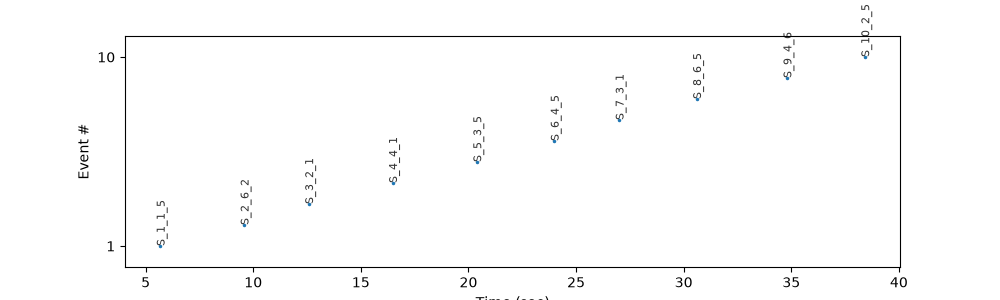
- plot(show_labels='auto', marker='.', units='sec', title=None, ax=None, **kwargs)[source]#
Plot events as points on a time axis.
- Parameters:
show_labels (
str) – Labeling strategy. “auto” (default) shows a subset spaced apart, “all” annotates every event, “none” disables labels.marker (
str) – Matplotlib marker style for the events (default ‘.’).units (
Optional[str]) – Units to display in the plot. Defaults to “sec”. Use None to keep existing units.ax (matplotlib.axes.Axes, optional) – axes to plot on; default: the current axes
**kwargs – Additional keyword arguments passed to
matplotlib.axes.Axes.plot().
- Return type:
- Returns:
the axes of the plot
Examples
The stimulus events of the example dataset:
>>> import pypillometry as pp
>>> import matplotlib.pyplot as plt
>>> d = pp.get_example_data("rlmw_002_short")
>>> fig, ax = plt.subplots(figsize=(10, 3))
>>> ax = d.events.filter("S_").plot(units="sec", ax=ax)
- row(i)[source]#
One event as a dict with its onset, label and metadata.
- Parameters:
i (
int) – index of the event- Return type:
- Returns:
{"onset": ..., "label": ..., <metadata columns>}
Examples
>>> ev = Events([100, 500], ["stim", "resp"], meta={"trial": [1, 1]})
>>> ev.row(0)
{'onset': 100.0, 'label': 'stim', 'trial': 1}
- set_meta(name, values, select=None, exact=False)[source]#
Set a metadata column.
- Parameters:
name (
str) – name of the column (a new or an existing one)values (scalar or array-like) – one value for all (selected) events, or one value per event (or per selected event, if select is given); None or NaN for missing values
select (str, callable, tuple or boolean array, optional) – only set the values of these events (see
filter()); the other events keep their value (or get a missing value, for a new column)exact (
bool) – if True, a string select matches only labels equal to it
- Return type:
- Returns:
new Events object with the column set
Examples
>>> ev = Events([0, 100, 400], ["F_1", "S_1", "C_1"])
>>> ev.set_meta("block", 1).meta["block"]
array([1, 1, 1])
>>> ev.set_meta("kind", "stimulus", select="S_").meta["kind"]
array(['', 'stimulus', ''], dtype='<U8')
- shift(by)[source]#
Events with shifted onsets.
- Parameters:
by (float or callable) – a time offset (in the units of the events) that is added to all onsets, or a time map: a function that takes an array of times and returns the new times (an array of the same length)
- Return type:
- Returns:
new Events with the same labels and metadata; data_time_range (if set) is moved in the same way. The events count as mapped to the eye-tracker clock (needs_sync is False).
- Raises:
ValueError – if the time map does not return one time per onset
Examples
>>> Events([100, 500], ["A", "B"]).shift(-100).onsets
array([  0., 400.])
>>> Events([100, 500], ["A", "B"]).shift(lambda t: t * 2).onsets
array([ 200., 1000.])
- to_array()[source]#
Convert events to numpy arrays.
Examples
>>> events = Events([100, 200], ["A", "B"], units="ms")
>>> onsets, labels = events.to_array()
- to_table()[source]#
Events as a table (copies of the columns).
The columns are “onset”, “label” and the metadata columns. The result is a
Table(a dict of columns that is displayed as a table;pandas.DataFrame(table)converts it).- Return type:
- Returns:
column name -> numpy array
Examples
>>> ev = Events([100, 500], ["stim", "resp"], meta={"trial": [1, 1]})
>>> sorted(ev.to_table())
['label', 'onset', 'trial']
>>> import pandas as pd
>>> df = pd.DataFrame(ev.to_table())
- to_units(target_units)[source]#
Convert event onsets to different time units.
- Parameters:
target_units (
Optional[str]) – Target units: “ms”, “sec”, “min” or “h”- Return type:
- Returns:
New Events object with converted units
- Raises:
ValueError – If target_units is not a time unit
Examples
>>> events = Events([1000, 2000], ["A", "B"], units="ms")
>>> events_sec = events.to_units("sec")
>>> events_sec.onsets
array([1., 2.])
- property meta#
Metadata of the events (read-only).
A mapping of column name -> numpy array (one value per event). It cannot be changed in place;
set_meta(),drop_meta(),parse_labels(),merge_table(),fill_meta()andadd_latency()return new Events with changed metadata.