
tweak#
- pypillometry.tweak(data, func, params, variable=None, time=None)[source]#
Interactively tweak function parameters while viewing the result.
Opens a viewer showing the original data with the function result overlaid. A parameter panel next to the plot allows adjusting numeric parameters in real-time, with the overlay updating to reflect the changes.
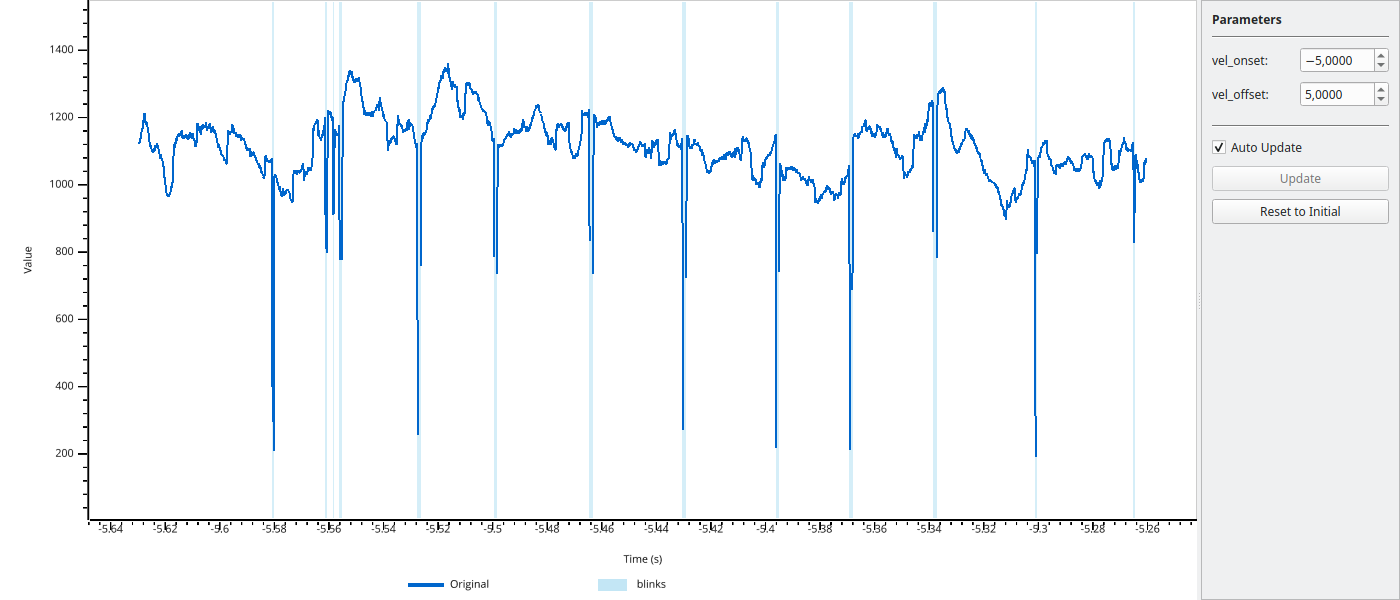
See Interactive Parameter Tweaking (pp.tweak) for more examples.
- Parameters:
data (EyeData, ndarray, or list of ndarrays) – Original data to display and pass to the function. For a list of arrays, only the first array is displayed (the whole list is passed to func).
func (callable) –
Function called as
func(data, **params). It receives data unchanged (for EyeData input the full EyeData object) and may return:params (dict) – Initial parameter values. Only numeric types (int, float) are supported. These become the adjustable parameters in the GUI.
variable (str, optional) – For EyeData objects, specifies which variable to display (e.g., ‘left_pupil’, ‘right_pupil’, ‘left_x’, ‘right_y’). If not provided, uses the first available of ‘left_pupil’, ‘right_pupil’, ‘left_x’, ‘right_x’, ‘left_y’, ‘right_y’.
time (ndarray, optional) – Time vector for array data. If not provided, uses sample indices. For EyeData, the time vector is taken from the object.
- Return type:
- Returns:
Final parameter values after user adjustments. Returns the parameter dict as it was when the viewer was closed.
- Raises:
TypeError – If a value in params is not an int or float.
ValueError – If variable is not found in the EyeData object, or if func returns an array with a different length than the displayed data.
RuntimeError – If func fails with the initial parameters (failures with later parameter values only print a warning).
Notes
Keyboard controls in the viewer:
Left/Right arrows, PgUp/PgDn: Pan view (10%/50%)
Up/Down arrows, +/-, mouse wheel: Zoom X-axis in/out
Home/End: Jump to start/end
Space: Reset to full view
Shift + Up/Down, Shift + mouse wheel: Zoom Y-axis
Shift + Space: Reset Y-axis
M: Toggle mask regions
I: Toggle interval highlights
H/?: Show help
Q/Esc: Close viewer
With “Auto Update” checked (default), changes to parameters are applied immediately and the overlay updates in real-time; otherwise use the “Update” button or press Enter in a parameter field. “Reset to Initial” restores the initial parameter values.
Examples
With EyeData - function receives full EyeData object:
>>> import pypillometry as pp
>>>
>>> eyedata = pp.get_example_data("rlmw_002_short")
>>>
>>> def smooth(d, lp=5):
...     return d.pupil.lowpass_filter(cutoff=lp, inplace=False)
>>>
>>> # Tweak lowpass filter cutoff, display left_pupil
>>> params = pp.tweak(eyedata, smooth, {'lp': 5}, variable='left_pupil')
Basic usage with numpy arrays:
>>> import numpy as np
>>>
>>> # Create sample data
>>> data = np.sin(np.linspace(0, 10, 1000)) + np.random.randn(1000) * 0.1
>>>
>>> # Define a smoothing function
>>> def smooth(x, window_size=10):
...     kernel = np.ones(window_size) / window_size
...     return np.convolve(x, kernel, mode='same')
>>>
>>> # Tweak the window_size parameter
>>> final_params = pp.tweak(data, smooth, {'window_size': 10})