SegmentedPupilNamespace#
- class pypillometry.segmented.SegmentedPupilNamespace(data=None)[source]#
Bases:
NamespaceMethods for pupil segments, accessed as
seg.pupil(e.g.,seg.pupil.baseline_correct((-200, 0))).The methods work on the pupil channels (
<eye>_pupil) of aSegmentedEyeDataobject (all eyes, or those given in eyes) and raise a KeyError if there is none. Averaging (average(),group_segments()) works for all channels.Methods
Correct each segment of the pupil channels for its baseline.
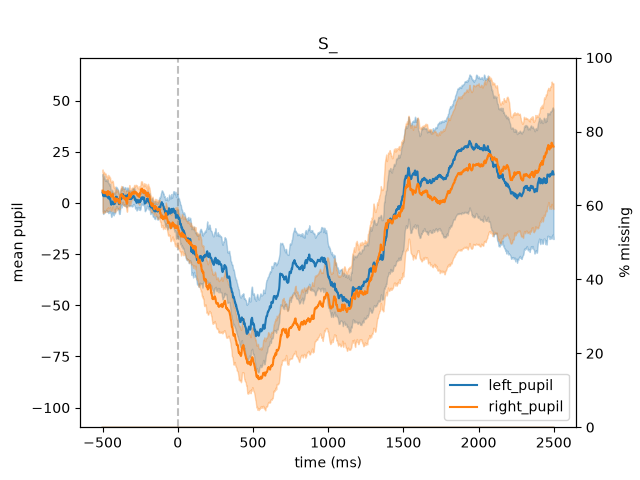
Plot the event-related pupil dilation: mean and error ribbon of the pupil channels over time.
Details
- baseline_correct(window=0, method='subtract', eyes=[], inplace=None)[source]#
Correct each segment of the pupil channels for its baseline.
The window is given in ms relative to the event onsets (time 0), e.g.,
window=(-200, 0)uses the mean of the 200 ms before each event. method says how the baseline is removed:"subtract"(default; the change from the baseline in the units of the data),"divide"(the ratio to the baseline) or"percent"(the change in % of the baseline,(x - base) / base * 100). Other channels (e.g., gaze) are not changed.- Parameters:
window (tuple (float, float), float, str, Quantity or None) –
Baseline window relative to event onset (time 0), in ms or with units (e.g.,
(-200, 0) * u.ms):If None, no baseline correction is applied
If tuple (start, end), the mean value in this time window is subtracted
If float, the value at the time point closest to this value is used
Default is 0 (baseline at event onset).
The window must be within the time axis of the segments.
method (
str) –"subtract"(default),"divide"or"percent"; segments whose baseline is masked (or 0, for"divide"and"percent") are maskedeyes (str or list of str, optional) – eyes whose pupil channels are corrected (default: all)
inplace (bool or None, optional) – if True, make change in-place and return the object; if False, return a new object with the corrected data; if None, use the package-level setting (see
set_default_inplace())
- Return type:
- Returns:
the baseline-corrected segments (the object or a new one, depending on inplace; the object itself if window is None)
- Raises:
ValueError – if the window (or time point) is not within the segments, its start is not before its end, or method is unknown
KeyError – if there are no pupil channels (of eyes)
Examples
>>> import pypillometry as pp
>>> from pypillometry import u
>>> d = pp.get_example_data("rlmw_002_short")
>>> epochs = d.get_epochs("S_", (-500, 2500) * u.ms)
>>> seg = d.get_segments(epochs)
>>> # Use pre-event period as baseline
>>> seg_bc = seg.pupil.baseline_correct(window=(-200, 0), inplace=False)
>>> seg = seg.pupil.baseline_correct(window=(-200, 0) * u.ms)
>>> # Use single time point as baseline, left eye only
>>> seg = seg.pupil.baseline_correct(window=-100, eyes="left")
>>> # Change in % of the baseline
>>> seg_pc = d.get_segments(epochs).pupil.baseline_correct((-200, 0), method="percent")
- plot(eyes=[], meanfct=<function mean>, varfct=<function sem>, show_missing=None, show_zero_line=True, show_legend=None, title=None, label=None, ribbon_alpha=0.3, ax=None, **kwargs)[source]#
Plot the event-related pupil dilation: mean and error ribbon of the pupil channels over time.
This is
SegmentedEyeData.plotfor the pupil channels (one line per eye); see there for the parameters.- Parameters:
eyes (str or list of str, optional) – eyes whose pupil channels are plotted (default: all)
- Returns:
ax (matplotlib.axes.Axes) – The axes object for further customization
Examples
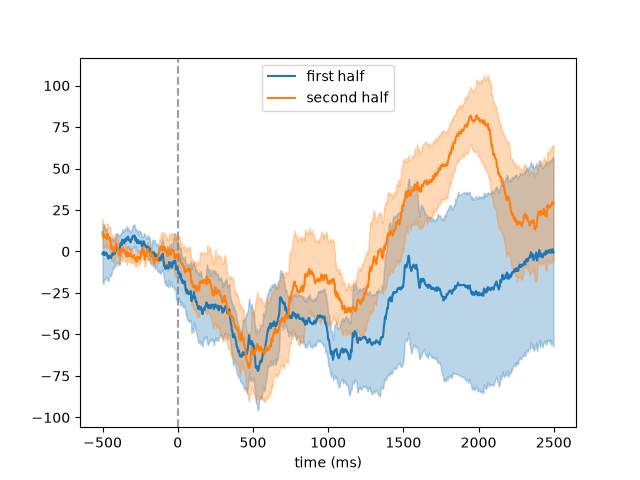
Event-related pupil dilation after each stimulus. Pass
ax=to overlay several segments (e.g., two conditions) in one plot:>>> import pypillometry as pp >>> from pypillometry import u >>> import matplotlib.pyplot as plt >>> d = pp.get_example_data("rlmw_002_short") >>> d = d | pp.pupil.blinks_detect() | pp.pupil.blinks_interpolate() >>> epochs = d.get_epochs("S_", (-500, 2500) * u.ms) >>> erpd = d.get_segments(epochs).pupil.baseline_correct((-500, 0)) >>> ax = erpd.pupil.plot() >>> # the left eye in the first and in the second half of the trials >>> fig, ax = plt.subplots() >>> half = erpd.epochs.onsets < erpd.epochs.onsets[5] >>> ax = erpd.keep(half).pupil.plot("left", ax=ax, label="first half") >>> ax = erpd.keep(~half).pupil.plot("left", ax=ax, label="second half") >>> legend = ax.legend()