

Importing data from Eyelink ASC files#
This example shows how to read .asc files generated from Eyelink EDF files using edf2asc. Usually, it is easier to read the EDF file directly, see the notebook on reading EDF files. However, the steps below show how to get data from any text-based format into pypillometry.
[1]:
import os
import pypillometry as pp
from pypillometry import u
import pandas as pd
import numpy as np
import matplotlib.pyplot as plt
In this example, we use data recorded with an Eyelink eyetracker. These eyetrackers store the data in binary files with the extension .edf. Some information about this file format is here. We use a command-line utility released by Eyelink to convert this proprietary format into a more easily read .asc file that is a whitespace-separated plain-text format. The converter, edf2asc, can be downloaded for different platforms from
the Eyelink support forum. There is a GUI-based program for Windows and command-line programs for Linux and Mac. Binaries of the command-line tools for Linux and Mac are included in the pypillometry repository under this link.
On Linux, we call the program twice on an example EDF file, once for the samples and once for the events:
[2]:
!../../external/edf2asc-linux -y -s ../../data/test.edf ../../data/test_samples.asc
!../../external/edf2asc-linux -y -e ../../data/test.edf ../../data/test_events.asc
EDF2ASC: EyeLink EDF file -> ASCII (text) file translator
EDF2ASC version 3.0 Linux Dec  1 2008
(c)1995-2007 by SR Research, last modified Dec  1 2008

processing file ../../data/test.edf
=====================Preamble of file ../../data/test.edf======================
| DATE: Fri Feb 14 08:48:33 2020                                              |
| TYPE: EDF_FILE BINARY EVENT SAMPLE TAGGED                                   |
| VERSION: EYELINK II 1                                                       |
| SOURCE: EYELINK CL                                                          |
| EYELINK II CL v6.12 Feb  1 2018 (EyeLink Portable Duo)                      |
| CAMERA: EyeLink USBCAM Version 1.01                                         |
| SERIAL NUMBER: CLU-DAC49                                                    |
| CAMERA_CONFIG: DAC49200.SCD                                                 |
| Psychopy GC demo                                                            |
===============================================================================

Converted successfully: 0 events, 1245363 samples, 6 blocks.

EDF2ASC: EyeLink EDF file -> ASCII (text) file translator
EDF2ASC version 3.0 Linux Dec  1 2008
(c)1995-2007 by SR Research, last modified Dec  1 2008

processing file ../../data/test.edf
=====================Preamble of file ../../data/test.edf======================
| DATE: Fri Feb 14 08:48:33 2020                                              |
| TYPE: EDF_FILE BINARY EVENT SAMPLE TAGGED                                   |
| VERSION: EYELINK II 1                                                       |
| SOURCE: EYELINK CL                                                          |
| EYELINK II CL v6.12 Feb  1 2018 (EyeLink Portable Duo)                      |
| CAMERA: EyeLink USBCAM Version 1.01                                         |
| SERIAL NUMBER: CLU-DAC49                                                    |
| CAMERA_CONFIG: DAC49200.SCD                                                 |
| Psychopy GC demo                                                            |
===============================================================================

Converted successfully: 37139 events, 0 samples, 6 blocks.
This results in two files, one containing all the samples and one all the recorded events.
[3]:
fname_samples = "../../data/test_samples.asc"
fname_events = "../../data/test_events.asc"
The samples file contains a large table with the timestamp, x/y-coordinates of the eye position and pupil area for the left and the right eye (plus a column with status flags). Here are the first few rows of this file:
[4]:
!head $fname_samples
3385900   817.3   345.2  1707.0   860.6   375.2  1738.0 .....
3385902   817.0   343.5  1706.0   860.7   375.9  1739.0 .....
3385904   816.7   341.6  1705.0   861.2   376.6  1739.0 .....
3385906   816.7   340.4  1706.0   861.7   376.8  1740.0 .....
3385908   816.7   340.2  1707.0   861.6   376.9  1742.0 .....
3385910   816.8   340.2  1708.0   861.1   377.1  1743.0 .....
3385912   816.9   340.9  1708.0   860.7   377.5  1744.0 .....
3385914   816.1   342.1  1710.0   861.1   378.7  1745.0 .....
3385916   815.2   343.2  1712.0   862.5   380.0  1746.0 .....
3385918   814.4   343.6  1713.0   863.9   380.7  1747.0 .....
We can read this file using pandas.read_table(). Eyelink marks missing x/y-coordinates with "." and missing pupil data with 0. We convert both to NaN, which pypillometry treats as missing data. This is an explicit step: pypillometry does not interpret 0 as missing by itself.
[5]:
df = pd.read_table(fname_samples,
                   names=["time", "left_x", "left_y", "left_p",
                          "right_x", "right_y", "right_p", "flags"],
                   na_values=".", skipinitialspace=True)

# Eyelink codes missing pupil data (e.g., blinks) as 0;
# set it to NaN so that pypillometry treats it as missing
df["left_p"] = df.left_p.replace(0, np.nan)
df["right_p"] = df.right_p.replace(0, np.nan)
df
[5]:
| time | left_x | left_y | left_p | right_x | right_y | right_p | flags | |
|---|---|---|---|---|---|---|---|---|
| 0 | 3385900 | 817.3 | 345.2 | 1707.0 | 860.6 | 375.2 | 1738.0 | ..... |
| 1 | 3385902 | 817.0 | 343.5 | 1706.0 | 860.7 | 375.9 | 1739.0 | ..... |
| 2 | 3385904 | 816.7 | 341.6 | 1705.0 | 861.2 | 376.6 | 1739.0 | ..... |
| 3 | 3385906 | 816.7 | 340.4 | 1706.0 | 861.7 | 376.8 | 1740.0 | ..... |
| 4 | 3385908 | 816.7 | 340.2 | 1707.0 | 861.6 | 376.9 | 1742.0 | ..... |
| ... | ... | ... | ... | ... | ... | ... | ... | ... |
| 1245358 | 5923060 | NaN | NaN | NaN | NaN | NaN | NaN | .C.C. |
| 1245359 | 5923062 | NaN | NaN | NaN | NaN | NaN | NaN | .C.C. |
| 1245360 | 5923064 | NaN | NaN | NaN | NaN | NaN | NaN | .C.C. |
| 1245361 | 5923066 | NaN | NaN | NaN | NaN | NaN | NaN | .C.C. |
| 1245362 | 5923068 | NaN | NaN | NaN | NaN | NaN | NaN | .C.C. |
1245363 rows × 8 columns
We can already use this information to create an EyeData object with pupil data only. We pass in the pupil area of both eyes (columns left_p and right_p) and the timestamps from the samples file. Gaps in the recording (where the eyetracker was paused) are filled with missing values:
[6]:
pp.EyeData(left_pupil=df.left_p, right_pupil=df.right_p, time=df.time, name="test")
pp: 14:36:28 | INFO     | fill_time_discontinuities:2139 | Filling in 5 gaps
pp: 14:36:28 | INFO     | fill_time_discontinuities:2141 | [32.35   4.012  6.21   2.02   1.862] seconds
[6]:
EyeData — test
Signal overview


Data glimpse
EyeDataDict(vars=2,n=1268585,shape=(1268585,)):
  left_pupil (float64): 1707.0, 1706.0, 1705.0, 1706.0, 1707.0...
  right_pupil (float64): 1738.0, 1739.0, 1739.0, 1740.0, 1742.0...
We can also import the eye-tracking (gaze) data from the same file. In that case, we use the EyeData class:
[7]:
pp.EyeData(left_pupil=df.left_p, right_pupil=df.right_p,
           left_x=df.left_x, left_y=df.left_y,
           right_x=df.right_x, right_y=df.right_y,
           time=df.time, name="test")
pp: 14:36:28 | INFO     | fill_time_discontinuities:2139 | Filling in 5 gaps
pp: 14:36:28 | INFO     | fill_time_discontinuities:2141 | [32.35   4.012  6.21   2.02   1.862] seconds
[7]:
EyeData — test
Signal overview


Data glimpse
EyeDataDict(vars=6,n=1268585,shape=(1268585,)):
  left_x (float64): 817.3, 817.0, 816.7, 816.7, 816.7...
  left_y (float64): 345.2, 343.5, 341.6, 340.4, 340.2...
  left_pupil (float64): 1707.0, 1706.0, 1705.0, 1706.0, 1707.0...
  right_x (float64): 860.6, 860.7, 861.2, 861.7, 861.6...
  right_y (float64): 375.2, 375.9, 376.6, 376.8, 376.9...
  right_pupil (float64): 1738.0, 1739.0, 1739.0, 1740.0, 1742.0...
This dataset is still missing the information contained in the events file which we need for analysing trial-related pupil data. The events file has a more complicated structure than the samples file:
[8]:
!head -20 $fname_events
** CONVERTED FROM ../../data/test.edf using edfapi 3.0 Linux Dec  1 2008 on Tue Nov 10 14:36:26 2026
** DATE: Fri Feb 14 08:48:33 2020
** TYPE: EDF_FILE BINARY EVENT SAMPLE TAGGED
** VERSION: EYELINK II 1
** SOURCE: EYELINK CL
** EYELINK II CL v6.12 Feb  1 2018 (EyeLink Portable Duo)
** CAMERA: EyeLink USBCAM Version 1.01
** SERIAL NUMBER: CLU-DAC49
** CAMERA_CONFIG: DAC49200.SCD
** Psychopy GC demo
**

MSG     2728855 DISPLAY_COORDS = 0 0 1919 1079
INPUT   2767568 0
MSG     2784000 !CAL
>>>>>>> CALIBRATION (HV9,P-CR) FOR LEFT: <<<<<<<<<
MSG     2784000 !CAL Calibration points:
MSG     2784000 !CAL -29.4, -23.5        -0,     -2
MSG     2784000 !CAL -29.3, -35.7        -0,  -1544
MSG     2784000 !CAL -32.9, -10.4        -0,   1559
After a header (lines starting with **) containing meta-information, we get a sequence of “events” which have different formats. We are interested in lines starting with “MSG” because those contain our experimental markers. Therefore, we read the events file and remove all rows that do not start with “MSG”:
[9]:
# read the whole file into variable `events` (list with one entry per line)
with open(fname_events) as f:
    events = f.readlines()

# keep only lines starting with "MSG"
events = [ev for ev in events if ev.startswith("MSG")]
events[0:10]
[9]:
['MSG\t2728855 DISPLAY_COORDS = 0 0 1919 1079\n',
 'MSG\t2784000 !CAL \n',
 'MSG\t2784000 !CAL Calibration points:  \n',
 'MSG\t2784000 !CAL -29.4, -23.5        -0,     -2   \n',
 'MSG\t2784000 !CAL -29.3, -35.7        -0,  -1544   \n',
 'MSG\t2784000 !CAL -32.9, -10.4        -0,   1559   \n',
 'MSG\t2784000 !CAL -49.7, -23.0     -2835,     -2   \n',
 'MSG\t2784000 !CAL -10.8, -27.4      2835,     -2   \n',
 'MSG\t2784000 !CAL -48.3, -33.3     -2818,  -1544   \n',
 'MSG\t2784000 !CAL -11.0, -34.2      2818,  -1544   \n']
Our experiment sent a marker called experiment_start when the experiment started. Hence, we can remove all events before this marker.
[10]:
experiment_start_index = np.where(["experiment_start" in ev for ev in events])[0][0]
events = events[experiment_start_index+1:]
events[0:10]
[10]:
['MSG\t3387245 C_GW_1_1_UD_UD\n',
 'MSG\t3390421 F_GW_1_1_10_0\n',
 'MSG\t3392759 C_NW_1_2_UD_UD\n',
 'MSG\t3394293 R_NW_1_2_UD_UD\n',
 'MSG\t3395952 F_NW_1_2_-1_0\n',
 'MSG\t3397974 C_NA_1_3_UD_UD\n',
 'MSG\t3399892 R_NA_1_3_UD_UD\n',
 'MSG\t3400999 F_NA_1_3_-11_0\n',
 'MSG\t3403206 C_GA_1_4_UD_UD\n',
 'MSG\t3404640 R_GA_1_4_UD_UD\n']
Now we can convert the events into a pandas.DataFrame for further processing.
[11]:
df_ev = pd.Series(events).str.split(expand=True)
df_ev
[11]:
| 0 | 1 | 2 | 3 | 4 | 5 | 6 | 7 | 8 | |
|---|---|---|---|---|---|---|---|---|---|
| 0 | MSG | 3387245 | C_GW_1_1_UD_UD | NaN | NaN | NaN | NaN | NaN | NaN |
| 1 | MSG | 3390421 | F_GW_1_1_10_0 | NaN | NaN | NaN | NaN | NaN | NaN |
| 2 | MSG | 3392759 | C_NW_1_2_UD_UD | NaN | NaN | NaN | NaN | NaN | NaN |
| 3 | MSG | 3394293 | R_NW_1_2_UD_UD | NaN | NaN | NaN | NaN | NaN | NaN |
| 4 | MSG | 3395952 | F_NW_1_2_-1_0 | NaN | NaN | NaN | NaN | NaN | NaN |
| ... | ... | ... | ... | ... | ... | ... | ... | ... | ... |
| 1065 | MSG | 5893078 | V_UD_UD_16_UD_UD | NaN | NaN | NaN | NaN | NaN | NaN |
| 1066 | MSG | 5899076 | V_UD_UD_17_UD_UD | NaN | NaN | NaN | NaN | NaN | NaN |
| 1067 | MSG | 5905073 | V_UD_UD_18_UD_UD | NaN | NaN | NaN | NaN | NaN | NaN |
| 1068 | MSG | 5911072 | V_UD_UD_19_UD_UD | NaN | NaN | NaN | NaN | NaN | NaN |
| 1069 | MSG | 5917071 | V_UD_UD_20_UD_UD | NaN | NaN | NaN | NaN | NaN | NaN |
1070 rows × 9 columns
In this table, the second column contains the timestamp (identical to the timestamp in the samples file), and the third column contains our custom markers (the format like “C_GW_1_1_UD_UD” is specific to our experimental design). There are more columns which seem to contain no information for most rows. Let’s check what those columns are for by printing the rows where the fifth column is not empty:
[12]:
df_ev[df_ev[4].notna()].head()
[12]:
| 0 | 1 | 2 | 3 | 4 | 5 | 6 | 7 | 8 | |
|---|---|---|---|---|---|---|---|---|---|
| 209 | MSG | 3900393 | RECCFG | CR | 500 | 2 | 1 | LR | NaN |
| 211 | MSG | 3900393 | GAZE_COORDS | 0.00 | 0.00 | 1919.00 | 1079.00 | NaN | NaN |
| 212 | MSG | 3900393 | THRESHOLDS | L | 56 | 231 | R | 66 | 239 |
| 213 | MSG | 3900393 | ELCL_WINDOW_SIZES | 176 | 188 | 0 | 0 | NaN | NaN |
| 215 | MSG | 3900393 | ELCL_PROC | CENTROID | (3) | NaN | NaN | NaN | NaN |
Apparently, there are more eyetracker-specific markers in our files (in this case due to drift checks during the experiment). We can drop those by removing all rows in which the fifth column is not empty and then dropping all other columns.
[13]:
df_ev = df_ev[df_ev[4].isna()][[1, 2]]
df_ev.columns = ["time", "event"]
df_ev
[13]:
| time | event | |
|---|---|---|
| 0 | 3387245 | C_GW_1_1_UD_UD |
| 1 | 3390421 | F_GW_1_1_10_0 |
| 2 | 3392759 | C_NW_1_2_UD_UD |
| 3 | 3394293 | R_NW_1_2_UD_UD |
| 4 | 3395952 | F_NW_1_2_-1_0 |
| ... | ... | ... |
| 1065 | 5893078 | V_UD_UD_16_UD_UD |
| 1066 | 5899076 | V_UD_UD_17_UD_UD |
| 1067 | 5905073 | V_UD_UD_18_UD_UD |
| 1068 | 5911072 | V_UD_UD_19_UD_UD |
| 1069 | 5917071 | V_UD_UD_20_UD_UD |
1035 rows × 2 columns
Finally, we can pass the event markers to our EyeData object.
[14]:
d = pp.EyeData(left_pupil=df.left_p, right_pupil=df.right_p, time=df.time,
               event_onsets=df_ev.time.astype(float), event_labels=df_ev.event,
               name="test")
d
pp: 14:36:29 | INFO     | fill_time_discontinuities:2139 | Filling in 5 gaps
pp: 14:36:29 | INFO     | fill_time_discontinuities:2141 | [32.35   4.012  6.21   2.02   1.862] seconds
[14]:
EyeData — test
Signal overview
Data glimpse
EyeDataDict(vars=2,n=1268585,shape=(1268585,)):
  left_pupil (float64): 1707.0, 1706.0, 1705.0, 1706.0, 1707.0...
  right_pupil (float64): 1738.0, 1739.0, 1739.0, 1740.0, 1742.0...
The summary shows that the eyetracker started recording at time 56.4 minutes. We can let the time start at 0 by using reset_time():
[15]:
d = d.reset_time()
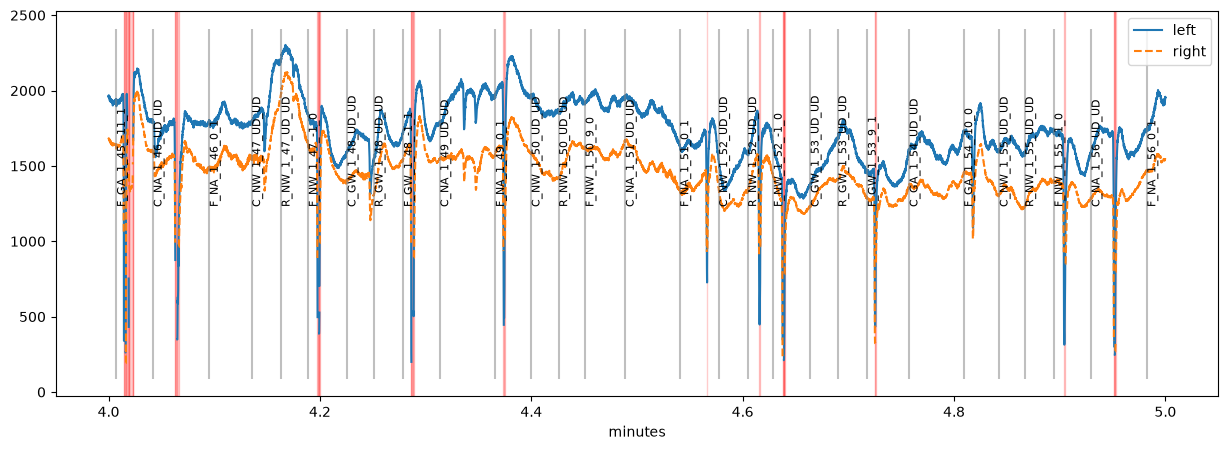
Now we can use all pypillometry functions on this dataset, e.g., plot a minute of the data. Missing (NaN) samples are masked automatically and highlighted in red. See the blinks notebook for how to detect and interpolate blinks.
[16]:
plt.figure(figsize=(15, 5))
d.plot.plot_pupil(plot_range=(4, 5) * u.min, units="min");
Generalize to multiple similar datasets#
Now that we have found a way to create our EyeData object from the raw files, we can wrap the code from this notebook into a function that creates such objects for any file with the same structure.
NOTE: You may want to consider using a configuration file to facilitate loading and sharing your study data.
The function takes the name of an EDF file as input, runs all the code above and returns the final EyeData object. For convenience, we assume that edf2asc has already been run so that the .asc files are available (see above).
[17]:
datapath = "../../data"  # this is where the data files are located

def read_dataset(edffile):
    basename = os.path.splitext(edffile)[0]  # remove .edf from filename
    fname_samples = os.path.join(datapath, basename+"_samples.asc")
    fname_events = os.path.join(datapath, basename+"_events.asc")
    print("> Loading '%s' and '%s'" % (fname_samples, fname_events))

    # read samples file
    df = pd.read_table(fname_samples,
                       names=["time", "left_x", "left_y", "left_p",
                              "right_x", "right_y", "right_p", "flags"],
                       na_values=".", skipinitialspace=True)
    df["left_p"] = df.left_p.replace(0, np.nan)
    df["right_p"] = df.right_p.replace(0, np.nan)

    # read events file, keep only messages after the experiment started
    with open(fname_events) as f:
        events = [ev for ev in f.readlines() if ev.startswith("MSG")]
    experiment_start_index = np.where(["experiment_start" in ev for ev in events])[0][0]
    events = events[experiment_start_index+1:]
    df_ev = pd.Series(events).str.split(expand=True)
    df_ev = df_ev[df_ev[4].isna()][[1, 2]]
    df_ev.columns = ["time", "event"]

    # create EyeData object
    d = pp.EyeData(left_pupil=df.left_p, right_pupil=df.right_p,
                   left_x=df.left_x, left_y=df.left_y,
                   right_x=df.right_x, right_y=df.right_y,
                   time=df.time,
                   event_onsets=df_ev.time.astype(float), event_labels=df_ev.event,
                   name=basename)
    return d.reset_time()
We can test this code by running the function with a filename located in datapath:
[18]:
d = read_dataset("test.edf")
> Loading '../../data/test_samples.asc' and '../../data/test_events.asc'
pp: 14:36:30 | INFO     | fill_time_discontinuities:2139 | Filling in 5 gaps
pp: 14:36:30 | INFO     | fill_time_discontinuities:2141 | [32.35   4.012  6.21   2.02   1.862] seconds
After that, we might want to save the final EyeData object to a file that can be loaded back quickly. This can be done using EyeData.write_file() or pp.write_file():
[19]:
os.makedirs("example_data", exist_ok=True)
fname = os.path.join("example_data", d.name+".pd")
print(fname)
d.write_file(fname)
example_data/test.pd
The dataset can be read back using EyeData.from_file():
[20]:
d2 = pp.EyeData.from_file(fname)
d2
[20]:
EyeData — test
Signal overview
Data glimpse
EyeDataDict(vars=6,n=1268585,shape=(1268585,)):
  left_x (float64): 817.3, 817.0, 816.7, 816.7, 816.7...
  left_y (float64): 345.2, 343.5, 341.6, 340.4, 340.2...
  left_pupil (float64): 1707.0, 1706.0, 1705.0, 1706.0, 1707.0...
  right_x (float64): 860.6, 860.7, 861.2, 861.7, 861.6...
  right_y (float64): 375.2, 375.9, 376.6, 376.8, 376.9...
  right_pupil (float64): 1738.0, 1739.0, 1739.0, 1740.0, 1742.0...
Recent history
- reset_time()