Interactive Parameter Tweaking (pp.tweak)
The tweak() function provides an interactive way to tune function parameters while seeing the result in real-time. The original data is displayed with the function result overlaid, and a parameter panel allows you to adjust values and immediately see the effect.
Keyboard shortcuts: Press H or ? in the viewer to see all available keyboard shortcuts for navigation and toggling display options.
Basic Usage with Arrays
The simplest use case is tweaking a function applied to numpy arrays:
import numpy as np
import pypillometry as pp

# Create noisy signal
t = np.linspace(0, 10, 1000)
signal = np.sin(2 * np.pi * 0.5 * t) + np.random.randn(1000) * 0.3

# Define a smoothing function
def smooth(data, window_size=20):
    kernel = np.ones(int(window_size)) / int(window_size)
    return np.convolve(data, kernel, mode='same')

# Tweak the window_size parameter interactively
final_params = pp.tweak(signal, smooth, {'window_size': 20}, time=t)

print(f"Final window_size: {final_params['window_size']}")

The white line shows the original data, and the green line shows the result of the function with the current parameters. Adjust parameters in the panel on the right.
Tweaking EyeData Processing
For pupillometry analysis, you often need to tune filter parameters. The tweak() function works with EyeData objects - the function receives the full EyeData and should return an EyeData:
import pypillometry as pp

eyedata = pp.get_example_data("rlmw_002_short")

# Define a function that applies lowpass filtering
def lowpass(data, cutoff=4.0):
    return data.pupil_lowpass_filter(cutoff=cutoff, inplace=False)

# Tweak the cutoff frequency
final_params = pp.tweak(
    eyedata,
    lowpass,
    {'cutoff': 4.0},
    variable='left_pupil'
)

print(f"Final cutoff: {final_params['cutoff']} Hz")
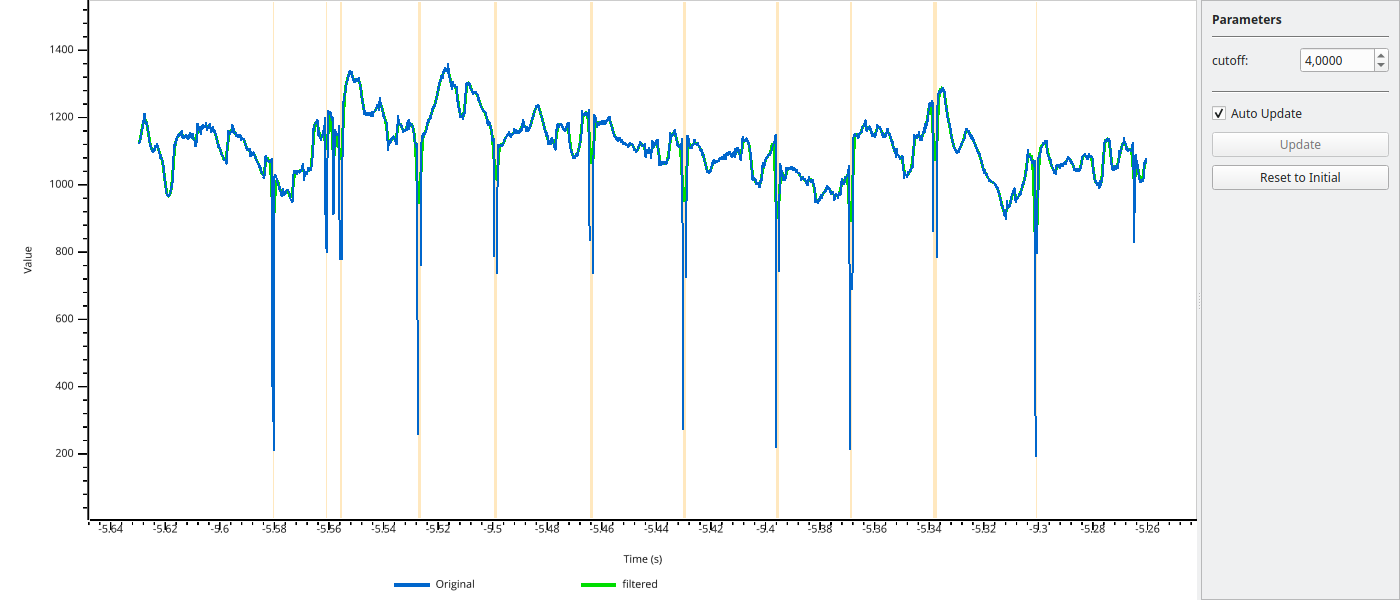
The variable parameter specifies which channel to display (e.g., 'left_pupil', 'right_pupil').
Tweaking Blink Detection
Another common use case is tuning blink detection parameters. Functions can return Intervals objects, which are displayed as highlighted regions:
import pypillometry as pp

eyedata = pp.get_example_data("rlmw_002_short")

# Define a function that detects blinks and returns intervals
def detect_blinks(data, vel_onset=-5.0, vel_offset=5.0):
    blinks = data.pupil_blinks_detect(
        apply_mask=False,
        vel_onset=vel_onset,
        vel_offset=vel_offset
    )
    return blinks.get('left_pupil')  # Returns Intervals

# Tweak the velocity thresholds
final_params = pp.tweak(
    eyedata,
    detect_blinks,
    {'vel_onset': -5.0, 'vel_offset': 5.0},
    variable='left_pupil'
)
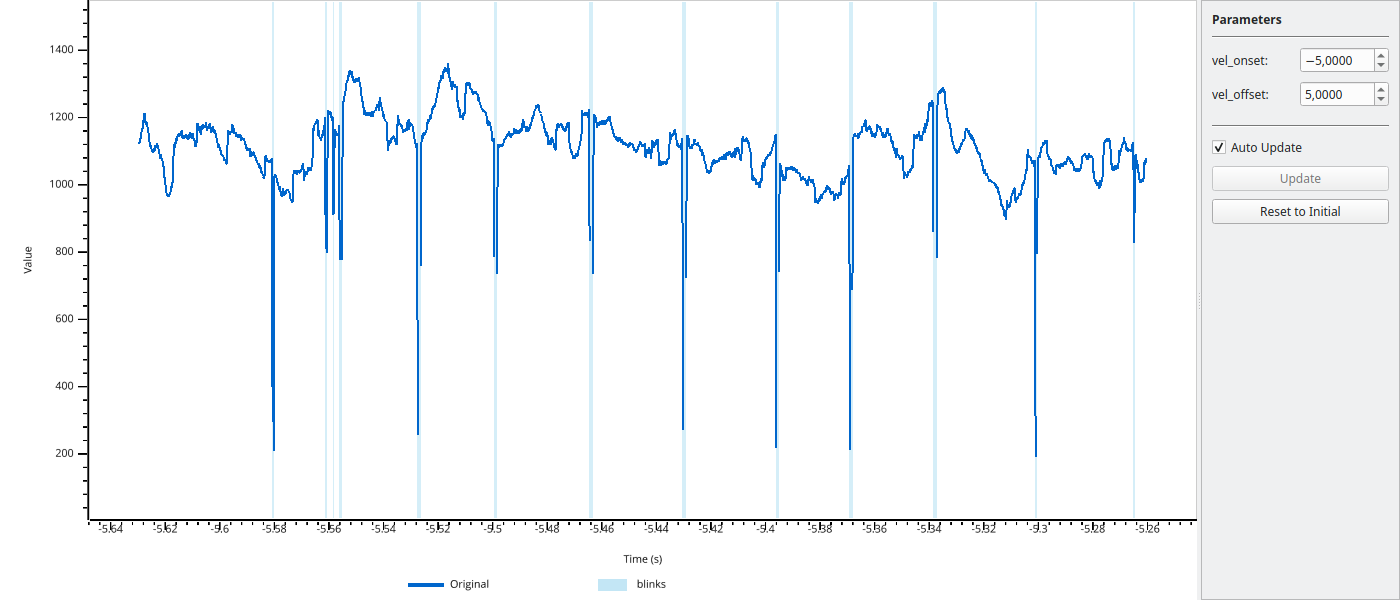
Detected intervals are shown as highlighted regions. Press I to toggle interval visibility.
GUI Controls
The parameter panel on the right side of the window provides:
Spinboxes for each parameter - adjust values by typing or using the arrows
Auto Update checkbox - when enabled, the plot updates immediately when you change a parameter
Update button - when auto-update is disabled, click to apply changes
Reset button - restore all parameters to their initial values
For computationally expensive functions, disable auto-update and use the Update button to avoid lag.
Return Values
Functions passed to tweak() can return different types:
numpy array: Displayed as an overlay line
dict of arrays: Multiple overlay lines with different colors
Intervals object: Displayed as highlighted regions
dict with arrays and Intervals: Both overlay lines and highlighted regions
Example returning multiple outputs:
import numpy as np
import pypillometry as pp

eyedata = pp.get_example_data("rlmw_002_short")

def process(data, cutoff=4.0, vel_onset=-5.0):
    # Apply filter
    filtered = data.pupil_lowpass_filter(cutoff=cutoff, inplace=False)
    filtered_signal = np.array(filtered['left_pupil'])

    # Detect blinks
    blinks = data.pupil_blinks_detect(apply_mask=False, vel_onset=vel_onset)

    # Return both
    return {
        'filtered': filtered_signal,
        'blinks': blinks.get('left_pupil')
    }

final_params = pp.tweak(
    eyedata,
    process,
    {'cutoff': 4.0, 'vel_onset': -5.0},
    variable='left_pupil'
)
API Reference
- pypillometry.tweak(data, func, params, variable=None, time=None)[source]
Interactively tweak function parameters while viewing the result.
Opens a viewer showing the original data with the function result overlaid. A parameter panel next to the plot allows adjusting numeric parameters in real-time, with the overlay updating to reflect the changes.
- Parameters:
data (EyeData, ndarray, or list of ndarrays) – Original data to display and pass to the function. For a list of arrays, only the first array is displayed (the whole list is passed to func).
func (callable) –
Function called as
func(data, **params). It receives data unchanged (for EyeData input the full EyeData object) and may return:an EyeData object: channel variable (and its mask) is overlaid
an array of the same length as the displayed data: overlaid as a line
an
Intervalsobject: shown as highlighted regionsa dict of arrays and/or
Intervalsobjects: one overlay line or highlight per entry
params (dict) – Initial parameter values. Only numeric types (int, float) are supported. These become the adjustable parameters in the GUI.
variable (str, optional) – For EyeData objects, specifies which variable to display (e.g., ‘left_pupil’, ‘right_pupil’, ‘left_x’, ‘right_y’). If not provided, uses the first available of ‘left_pupil’, ‘right_pupil’, ‘left_x’, ‘right_x’, ‘left_y’, ‘right_y’.
time (ndarray, optional) – Time vector for array data. If not provided, uses sample indices. For EyeData, the time vector is taken from the object.
- Returns:
Final parameter values after user adjustments. Returns the parameter dict as it was when the viewer was closed.
- Return type:
dict
- Raises:
TypeError – If a value in params is not an int or float.
ValueError – If variable is not found in the EyeData object, or if func returns an array with a different length than the displayed data.
RuntimeError – If func fails with the initial parameters (failures with later parameter values only print a warning).
Examples
With EyeData - function receives full EyeData object:
>>> import pypillometry as pp
>>>
>>> eyedata = pp.get_example_data("rlmw_002_short")
>>>
>>> def smooth(d, lp=5):
...     return d.pupil_lowpass_filter(cutoff=lp, inplace=False)
>>>
>>> # Tweak lowpass filter cutoff, display left_pupil
>>> params = pp.tweak(eyedata, smooth, {'lp': 5}, variable='left_pupil')
Basic usage with numpy arrays:
>>> import numpy as np
>>>
>>> # Create sample data
>>> data = np.sin(np.linspace(0, 10, 1000)) + np.random.randn(1000) * 0.1
>>>
>>> # Define a smoothing function
>>> def smooth(x, window_size=10):
...     kernel = np.ones(window_size) / window_size
...     return np.convolve(x, kernel, mode='same')
>>>
>>> # Tweak the window_size parameter
>>> final_params = pp.tweak(data, smooth, {'window_size': 10})
Notes
Keyboard controls in the viewer:
Left/Right arrows, PgUp/PgDn: Pan view (10%/50%)
Up/Down arrows, +/-, mouse wheel: Zoom X-axis in/out
Home/End: Jump to start/end
Space: Reset to full view
Shift + Up/Down, Shift + mouse wheel: Zoom Y-axis
Shift + Space: Reset Y-axis
M: Toggle mask regions
I: Toggle interval highlights
H/?: Show help
Q/Esc: Close viewer
With “Auto Update” checked (default), changes to parameters are applied immediately and the overlay updates in real-time; otherwise use the “Update” button or press Enter in a parameter field. “Reset to Initial” restores the initial parameter values.